Devil Hunter Codes
Your complete source for all up-to-date active Devil Hunter codes and a comprehensive guide on how to redeem codes in Devil Hunter. Check back regularly for new codes!
If you have problems on how to redeem codes in Devil Hunter, scorll down through the codes list and we have a verified step by step guide that will work for you!
Current Latest Active Codes for Devil Hunter(10 codes available)
CATCHPATCHNew!Rewards:
SORRYFORTHEDELAYDEVILRewards:
ONMYSONRewards:
STEVEFROMMINECRAFTRewards:
ARTHURSAGENTSRewards:
40MVISITS!Rewards:
9M30SHOTFIXRewards:
BUGFIXESRewards:
900KMEMBERSRewards:
200KLIKESRewards:
💡 Important: Codes are case-sensitive. If a code doesn't work, it may have expired. Check back regularly for new Devil Hunter codes!
Expired Codes(No longer working)
The following codes have been confirmed as expired by multiple sources as of May 25, 2026:
SRY4SHUTDOWNDELAYDEVILCLANDEVILGUNDEVILUPDATEONE6767SORRYFORDELAY100KLIKESPOWEREDBYMELOUPDATE01600KMEMBERSFREESLOTSORRYFORBUGSPT2SORRYFORBUGSFPSILOVEROBLOX75KLIKESSHUTDOWNSORRY50KLIKESMELO150KRELEASE202620KLIKES10KLIKESHow to Redeem Codes in Devil Hunter
Redeeming codes in Devil Hunter isn't as simple as it seems. You need to complete several prerequisites before you can start redeeming codes:
Unlock the Phone Feature
Play through the game's tutorial until you unlock the phone feature. This is a key milestone that allows you to access the codes menu.
⌨️ Once Unlocked: Press N to open your phone and navigate to the "Codes" section.
Join the Devil Hunter Community
You must join the Devil Hunter Roblox group to redeem codes. This is a requirement for code redemption to work.
👥 Visual Guide - How to Join:
- Scroll down on the Devil Hunter game page and look for the "Developer" section
- Click on the developer name to open their profile
- Click the "Join Community" button on their profile page
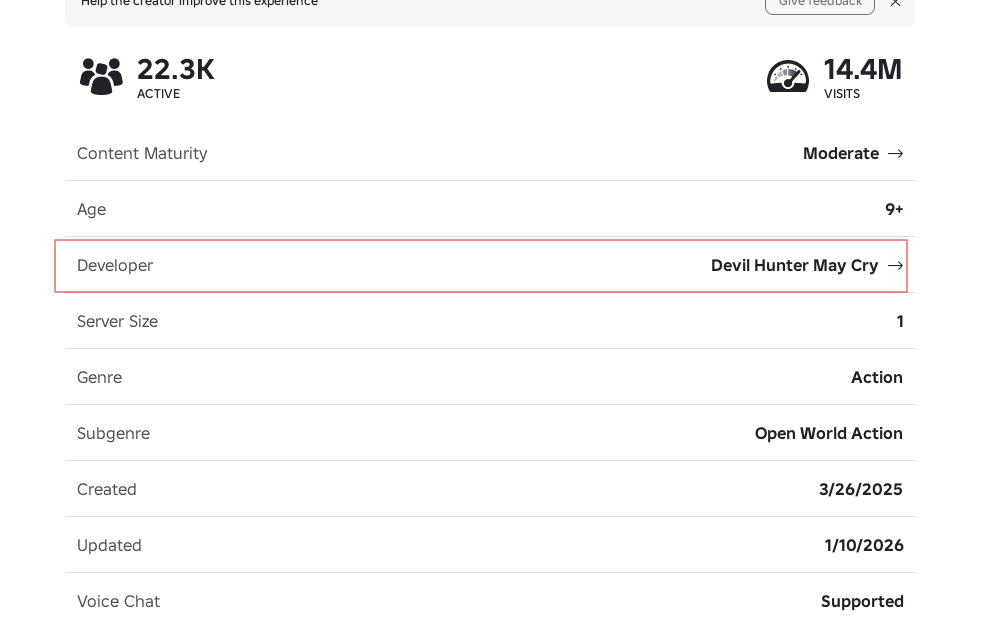
Step 1: Scroll down and click on the Developer
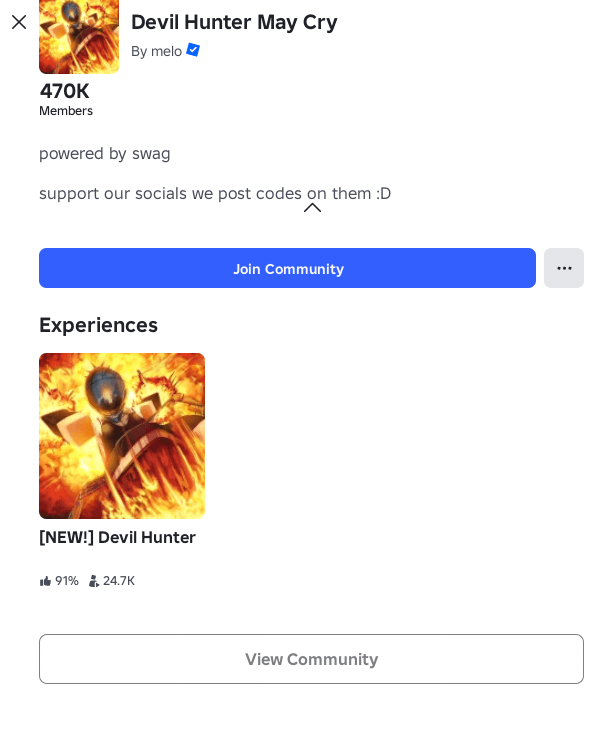
Step 2: Click "Join Community" button to join the group
✓ Done! Once you've joined, you can proceed to redeem codes. If you still get an error about joining a group, wait a moment and try again.
Reach Your First Rank Up
Some codes (or possibly all codes) require you to progress far enough in the game to achieve your first rank up (fill 5 stars). This ensures you've learned the basics before redeeming rewards.
⚠️ Why This Matters: The game may prevent code redemption until you've reached certain milestones. If codes aren't working, make sure you've progressed through enough of the game and completed missions to rank up.
📚 Need Help Progressing? Check out our comprehensive guides to help you rank up faster:
- • Beginner's Guide - Complete walkthrough for new players
- • All Guides - More in-depth guides on progression, combat, and more
Redeem Your Codes
Once you've completed all the prerequisites above, you can finally redeem codes:
- Press N to open your phone
- Navigate to the "Codes" section
- Type a code from above into the textbox (codes are case-sensitive)
- Press Enter to redeem
- Enjoy your rewards!
⚠️ Troubleshooting
- • Code not working? Make sure you've joined the Devil Hunter Roblox group
- • Phone not opening? You may not have unlocked it yet - continue playing through the tutorial
- • Still having issues? Try reaching your first rank up or progressing further in the game
- • Code expired? Codes do expire over time. Check back for new active codes!
Last updated: May 25, 2026