Controls & Keybinds
Master Devil Hunter with these default controls. Supports both keyboard and controller with customizable keybindings.
Here we have listed all the default keyboard controls. If you are using a controller, scroll to the last section to see the full list of console controls and how to customize keybinds.
Customizable Keybindings
Devil Hunter supports custom keybinding! You can rebind all controls to your preferred keys in the game settings.
Controller Support
The game fully supports controllers in addition to keyboard and mouse. Connect your controller and customize the bindings.
Default Keyboard Controls
These are the default keybindings. Remember, you can customize all of these in the game settings!
Basic Movement
Combat
Abilities
Interface & Utilities
Advanced Combos
Master these combos to dominate in combat. Timing and execution are key!
Uppercut - Launch enemies into the air
Full Aerial Combo - Slam enemies to the ground
Aerial Attack - Attack while airborne
Running Attack - Attack while sprinting
Advanced Mechanics
Essential techniques for movement and combat mastery.
Wall Running
Look at a wall and run toward it to wall run
Great for mobility and reaching high places
Wall Climbing
Use classic wall climb mechanics to scale vertical surfaces
Useful for exploration and gaining height advantage
Parrying
Parry green attacks from devils for counterattacks
Master timing to dominate devil encounters
Dodging
Dodge when devils jump in the air - these attacks cannot be parried
Watch for jump animations and dodge accordingly
Console/Controller Controls
Default controller bindings for PlayStation and Xbox. Actions not listed do not have default keybinds and can be customized in-game.
Devil Hunter Console Controls PlayStation
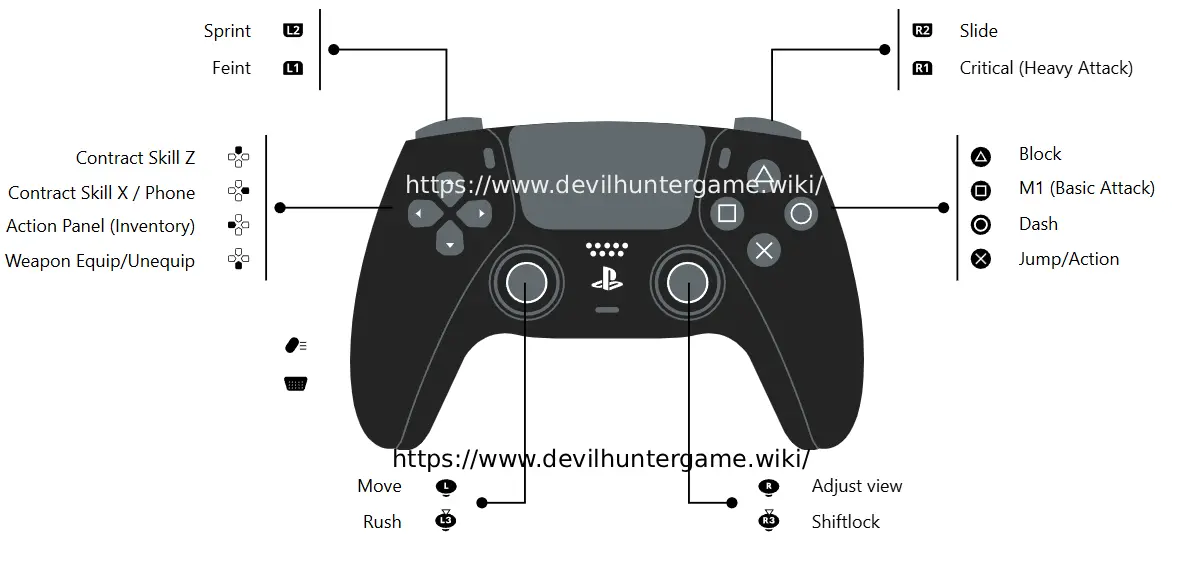
Devil Hunter Console Controls PlayStation Xbox
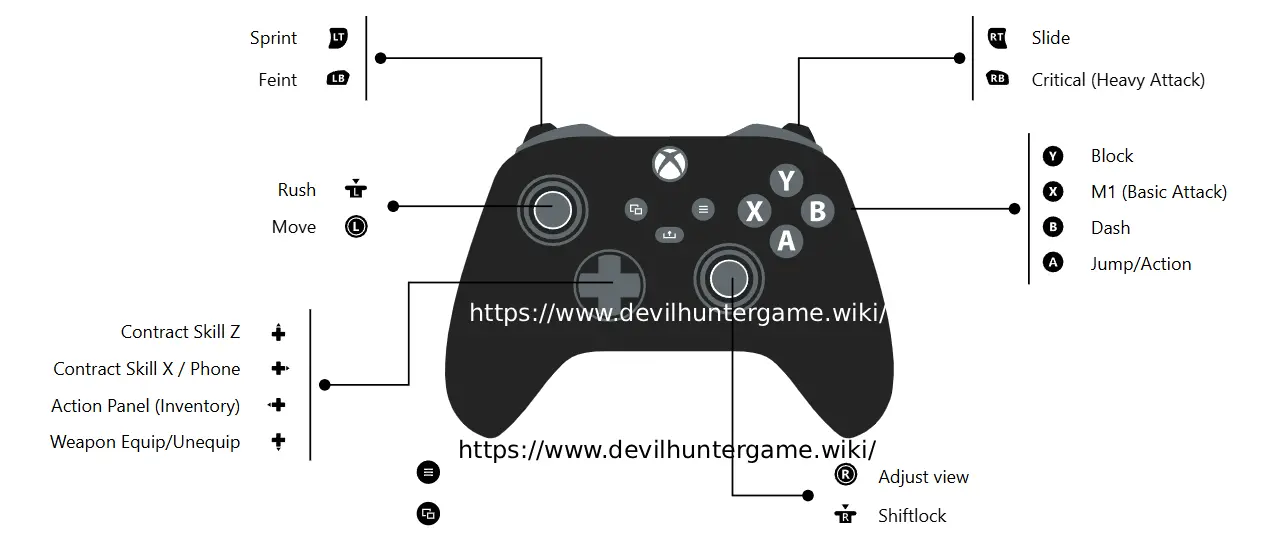
Note: Actions not listed in the controller diagrams above do not have default keybinds. You can customize all controller bindings in the game settings menu.
How do I customize the keybinds in Devil Hunter?
Follow these simple steps to access and customize your keybindings in-game.
- 1
Click the Settings Icon
Look for the settings gear icon in the top-right corner of your screen and click on it.
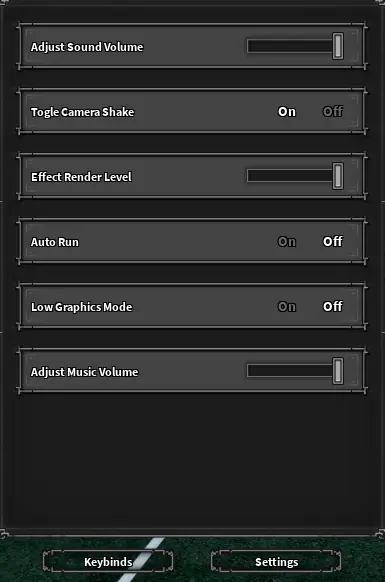
- 2
Click Keybinds at the Bottom
In the settings menu, scroll to the bottom and click on the "Keybinds" button to open the keybinding customization screen.
- 3
Rebind Your Controls
Click on any action you want to rebind, then press your preferred key or button. The game will automatically assign the new binding. You can customize both keyboard and controller bindings here.
💡 Pro Tip: If you ever mess up your bindings or want to start fresh, there's usually a "Reset to Default" option in the keybinds menu that will restore all controls to their original settings.
Last updated: January 11, 2026